Robotics development
Turn motion, sensing, and control into an integrated robotic system built around your application.
From electronic devices to the software that brings them to life. We help you build, connect, and control the technology behind your next instrument.
Connected disciplines. One engineering partner.
Bring us your concept, your board, or the challenge standing between you and a working system.
Turn motion, sensing, and control into an integrated robotic system built around your application.
Shape your instrument from concept to a functional electronic design, with hardware and firmware working together.
Give your hardware a software foundation. Request a BSP tailored to your board, peripherals, and operating environment.
A board support package connects your instrument’s hardware to its operating system. Tell us what you’re building, and we’ll help define the software layer it needs.
Request BSP developmentExplore Home Sense, a project in development that brings household information together in one interface.
A home dashboard for refrigerator and freezer conditions, household inventory, shopping lists, and device settings. Home Sense runs on Ghimire Robotics OS. These development screenshots show simulated temperature readings, editable inventory, and a shopping checklist.

Refrigerator and freezer conditions, weather, and shopping reminders.

Storage locations, quantities, and stock status for everyday essentials.

A checklist view for items that need replenishing.

Date and time, Wi-Fi connection, and device information.

An expanded sidebar connects overview, inventory, shopping, and settings.
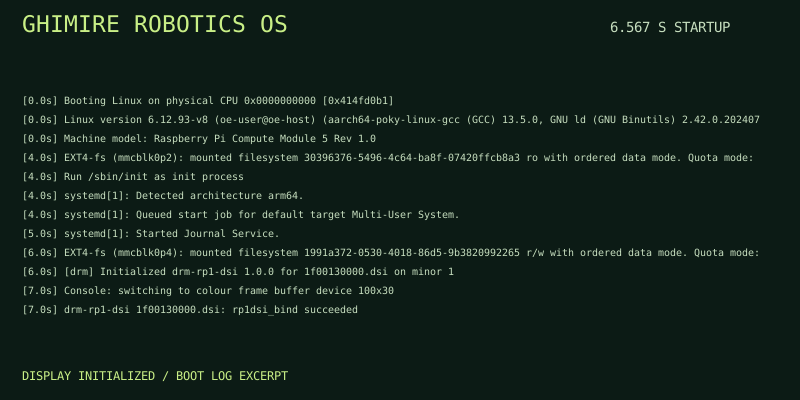
A look inside Ghimire Robotics OS booting on a Raspberry Pi Compute Module 5. Follow the kernel, system initialization, and display bring-up in this animated excerpt from our development boot log.
Startup finished in 3.619s (kernel) + 2.948s (userspace) = 6.567s
multi-user.target reached after 2.912s in userspace.
Measured on this development system. Firmware and bootloader time are not included in the reported total.
Share your application, platform, interfaces, and the problem you need to solve.
Align on requirements, deliverables, hardware dependencies, and a practical development plan.
Develop the hardware or software layer and integrate it with the target system.
Check the agreed functionality and prepare the documentation for your next step.
Start with the essentials. For a BSP request, include your processor or board, operating system, and the interfaces your instrument needs.